Ask in plain language
No search syntax. Ask what changed, what matters, or what needs follow-up.
CoBrain is the AI assistant inside Workroomly for grounded answers, summaries, drafts, transcription, and next steps across the work your team is already doing.
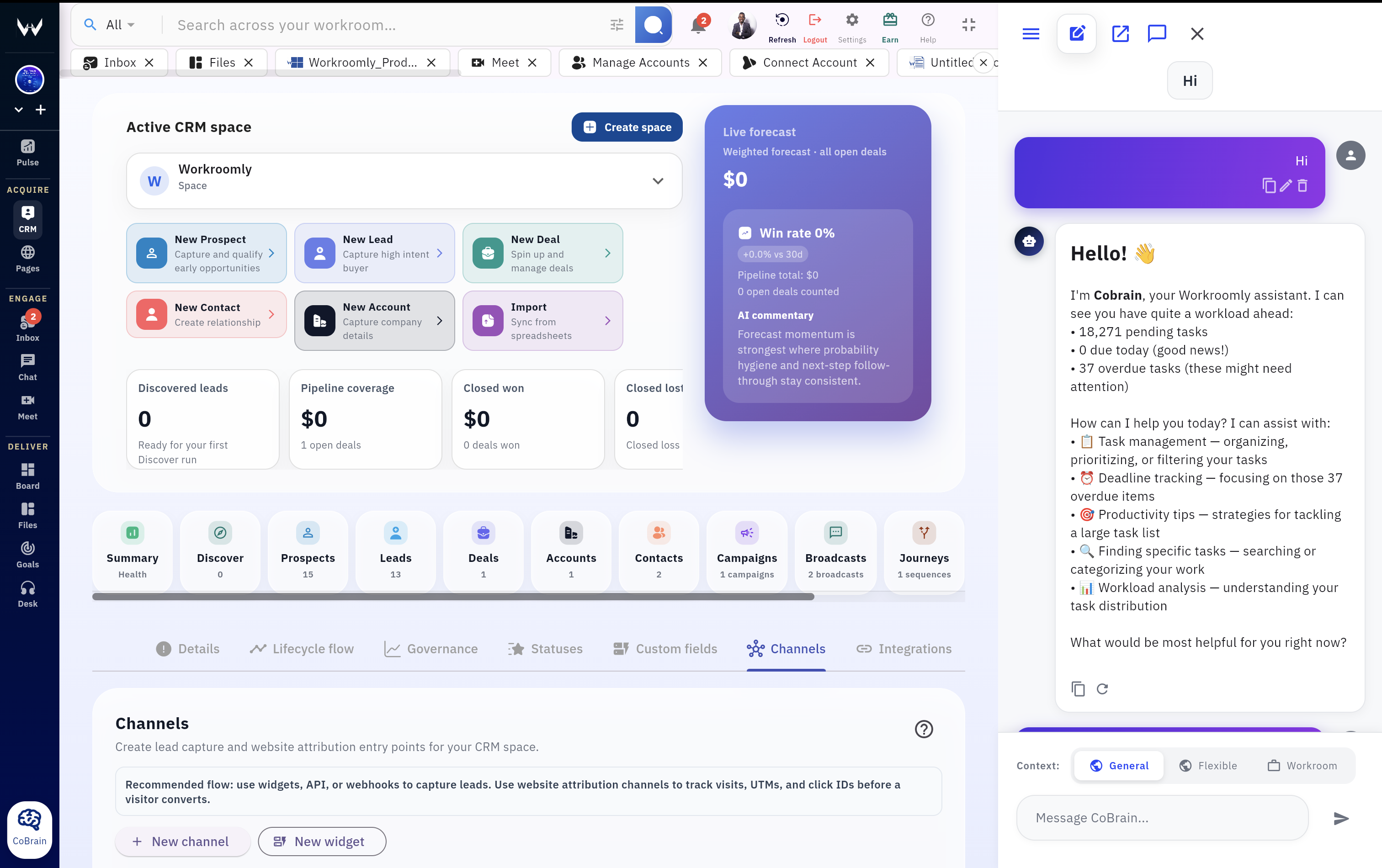
CoBrain uses the selected context mode, retrieves relevant workspace sources, and turns the response into a next action.
No search syntax. Ask what changed, what matters, or what needs follow-up.
Use context from CRM, Desk, Boards, Pages, Files, Chat, Goals, and Pulse.
Summaries, drafts, explanations, decisions, and recommended next steps.
Use CoBrain as a floating assistant, sidebar panel, or full workspace tab.
Most teams do not need more disconnected AI. They need an assistant that understands the workspace, respects the right context boundary, and helps them act.
Use CoBrain to brief the team, explain a customer situation, draft a response, create a task, summarize a meeting, or trace an answer back to workspace context.
Choose the right boundary for each question: private workspace context, general AI, or a flexible mix when the job needs both.
Start a CoBrain thread, continue it later, rename it, clear it, or remove it when the investigation is done.
CoBrain is designed around retrieval and sources so answers can be traced back to workspace context.
Turn customer context, board updates, and conversation history into the email, response, or next step.
Ask CoBrain to convert a blocker, meeting note, or risk into a concrete task your team can execute.
Use AI transcription and meeting summary workflows to keep decisions from disappearing after calls.
Move from question to source-aware answer, then turn the result into a reply, summary, task, meeting note, or team update without leaving the workspace.
Use it as a floating assistant, a sidebar, or a full tab depending on the job.
Select workroom-only, flexible, or general mode before asking the question.
Use saved shortcuts or type a direct question about the work in front of you.
Use grounded context and conversation history to validate the response.
Draft the reply, summarize the board, create the task, or brief the team.
CoBrain is more useful when it can draw from the same customer records, conversations, files, goals, and work streams your team already uses.
Deal context, account history, pipeline questions, and follow-up drafts.
Ticket history, customer escalations, support summaries, and reply assistance.
Project status, blockers, priorities, and task-level execution context.
Published pages, routed intake widgets, and structured customer signals.
Documents, reports, notes, and workspace knowledge retrieval.
Conversation history, alignment signals, and thread summaries.
Strategic priorities that help shape recommendations and tradeoffs.
Activity signals that show momentum, risk, and team operating rhythm.
Ask what changed, who owns it, what needs follow-up, and what the team needs to do next.
Ask what changed across customer work, boards, desk tickets, and team activity before the day starts.
Draft a response using CRM context, prior messages, support history, and the next promised action.
Summarize blockers, overdue items, owners, and priority risks without manually reading every card.
Transcribe discussion, summarize decisions, and turn follow-through into tasks or customer updates.
CoBrain helps teams move beyond isolated answers by keeping workspace context, reusable conversations, and next actions in one place.
| Need | CoBrain | Generic AI chat | Standalone doc AI |
|---|---|---|---|
| Workspace context | Native context across Workroomly modules and conversations. | User must paste context manually. | Usually limited to selected documents. |
| Context boundaries | Workroom-only, flexible, and general modes built into the experience. | Depends on manual context gathering and careful setup. | Often tied to one content surface. |
| Follow-through | Drafts, summaries, tasks, and meeting workflows live near execution. | Requires copying output back into tools. | Strong for reading, weaker for operating. |
| Repeatable team workflows | Saved conversations and shortcuts support repeated operating rituals. | Chat history is disconnected from the workroom. | Limited to document-centric patterns. |
Give every team member a faster way to understand customers, projects, conversations, files, and priorities before they decide what to do next.